Музична підказка

Створіть чистий музичний мітки з часовими кодами, тривалістю та метаданими доріжок з вашої монтажної послідовності. Завантажте файл XML або EDL і створіть CSV, XLSX, PDF, TXT або інші формати для використання в Google Sheets, Microsoft Excel, Apple Numbers та інших подібних програмах.

Кадрова частота
Експорт
Пресети
Warning! This preset only works for XLSX (Excel) exports.
Frame handles

Choose the music libraries that you want to check for more metadata:


в процесі...

We created this tool to save you time!

30.000+

cue sheets created

1.500.000+

audio clips processed

15.000.000+

track metadata records

Що робить цей інструмент?

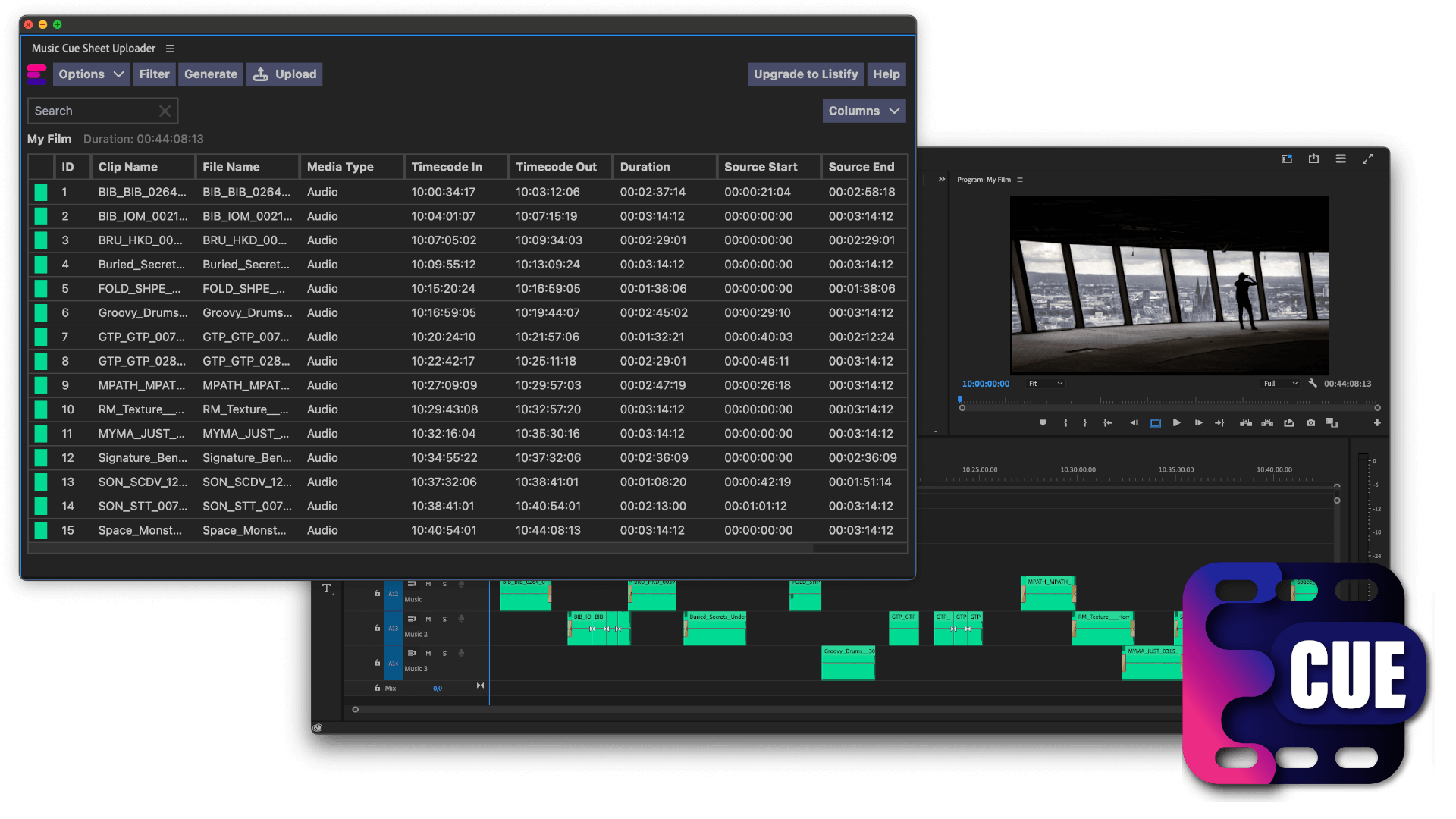
Генератор міток швидко створить простий список усіх музичних доріжок, використаних у вашому проекті. Інструмент може читати послідовності з Media Composer, Premiere Pro, Resolve і Final Cut Pro. Він об'єднує кілька доріжок і видаляє невидимі зрізи, щоб отримати чистий список. На основі назв файлів метадані музичних доріжок також можуть бути автоматично додані до мітки, якщо вони походять з однієї з наших бібліотек-партнерів. Експорт можна налаштувати за допомогою пресетів і експортувати в різні формати, зокрема CSV, XLSX і PDF.

Які формати файлів я можу завантажити?

  • EDL - Edit Decision List (.edl)
  • XML - Final Cut 7 XML (.xml)
  • XML - Extensible Markup Language (.xml) (Avid Media Composer)
  • TXT - Avid Pro Tools TXT -> Інформація про сеанс як текст (.txt)
  • FCPXML - Final Cut Pro X (.fcpxml)
  • CSV (comma or semicolon separated) (.csv)
  • AAF - Advanced Authoring Format (.aaf) → only in our Cue Sheet Manager for Pro Users

Scan production music libraries for metadata

By partnering with over 20 production music libraries, the tool is able to automatically pull metadata for tracks from these libraries. The metadata contains not only the track name and artist but also details about the label, publisher, composer details, and shares. Please note that the available metadata depends on the library.

Ознайомтеся з музикою з бібліотек, які співпрацюють з нами, і полегшіть собі роботу, використовуючи треки з цих бібліотек.


У вас немає бібліотеки або ви працюєте в музичній бібліотеці? Зв'яжіться з нами і станьте партнером, щоб ваші клієнти могли скористатися нашим інструментом. Стати партнером - це простий і зрозумілий процес.

Метадані будуть додані за допомогою назв файлів. Щоб переконатися, що всі пісні будуть розпізнані, не слід перейменовувати файли після завантаження. Ми не несемо жодної юридичної відповідальності за точність даних. Ви зобов'язані самостійно перевіряти коректність вашого cue-листа.
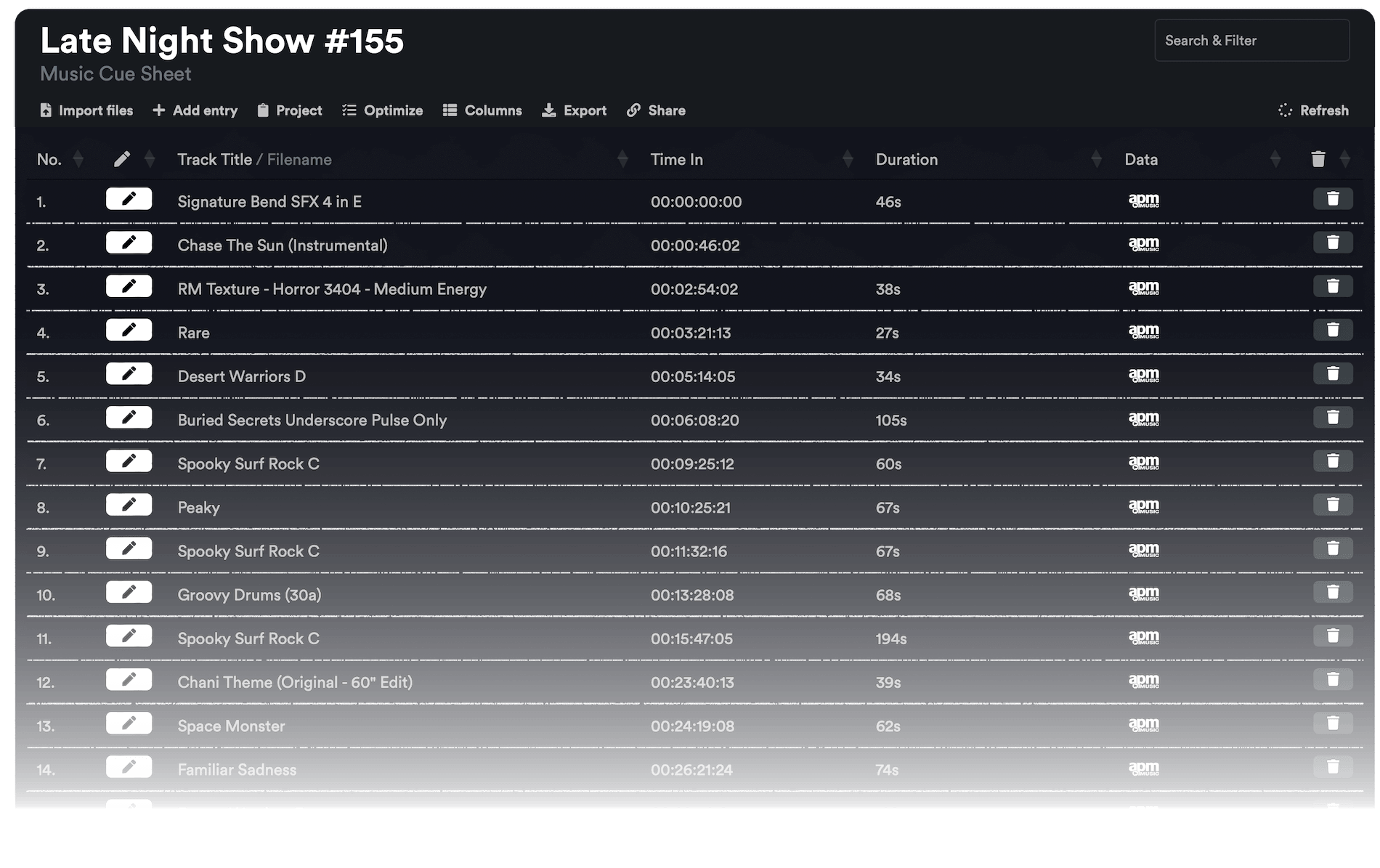
The workflow in detail

Learn how this cue sheet tool works.

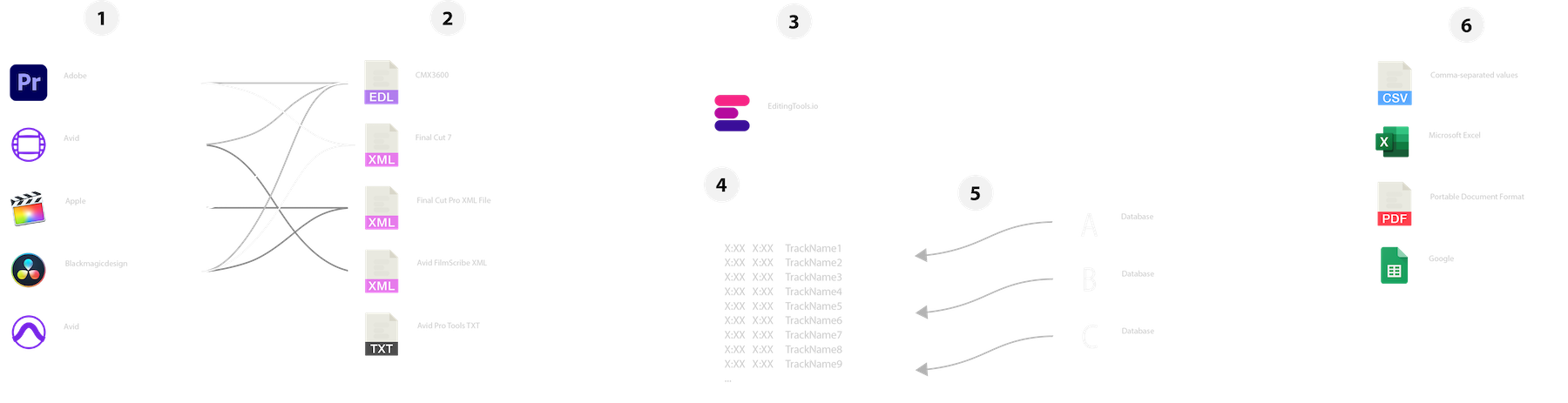
There are 6 simple steps you can follow to get the best workflow results:

  1. Prepare the sequence for which you want to create a cue sheet. It is best to make a copy and clean up the tracks, removing clips that do not belong there. It is a good idea to collect all the cues on 2 or 3 tracks and export only those tracks.
  2. Depending on the software you are using, you can export an EDL, XML or ProTools Session TXT. If you are using Adobe Premiere Pro or DaVinci Resolve, we recommend that you export a Final Cut 7 XML.
  3. Upload your sequence to our Music Cue Sheet Tool and choose your desired settings. The tool will analyze your sequence and create a sorted track list.
  4. The track list calculates the duration of each clip. Depending on your settings, similar clips are grouped together.
  5. If you enable the "Include metadata from music libraries" option and select the libraries from which you used music, the tool will check for additional metadata in those libraries. The information is pulled from data provided directly by our library partners via API or shared database. This includes information about the music album, the composer and artist up to library codes and label names.
  6. Once all the information is collected, it is exported to the file format of your choice. The recommended export format is CSV, which contains all the data you need and can be easily edited using Excel, Numbers, or Google Sheets.

Демонстраційні файли

Спробуйте таблицю міток з нашими демонстраційними файлами:

Підготуйте свою послідовність

Перед завантаженням послідовності рекомендується зробити швидку підготовку. Найкращий спосіб зробити це - продублювати послідовність і видалити всі непотрібні аудіо- та відеодоріжки, які ви не хочете мати у своїй таблиці міток. Також важливо вирівняти всі доріжки, якщо ви використовуєте загорнуті/вкладені аудіокліпи. Також видаліть "Ефекти переходів аудіо" на випадок, якщо інструмент не спрацює.

Об'єднати однакові кліпи, що перекриваються

Якщо цей параметр увімкнено, кліпи, розрізані на кілька частин у вашій послідовності, автоматично об'єднуються в один запис, якщо між ними немає розриву. Якщо інструмент знайде той самий кліп на кількох доріжках, їх також буде об'єднано і показано як один запис.

Використовуйте маркери кадрів, щоб знайти та об'єднати однакові кліпи

Використовуйте цю опцію, щоб об'єднати кліпи, навіть якщо між ними є проміжок. Ви можете вказати діапазон від 1 до 500 кадрів, які потрібно об'єднати. Якщо інструмент знайде той самий кліп на кількох доріжках, їх також буде об'єднано і показано як один запис.

Пресети

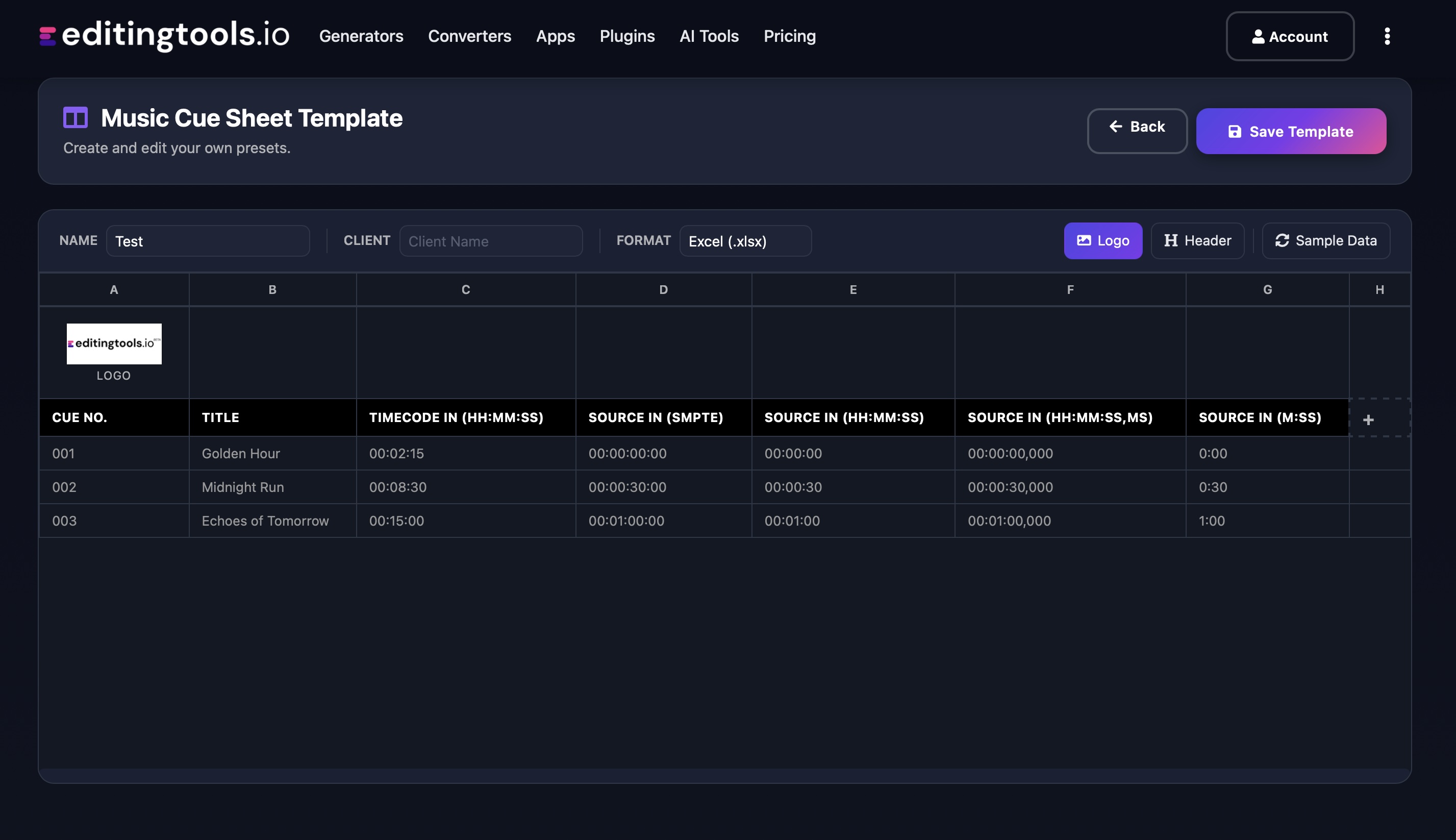
Ви можете налаштувати стовпці у файлах експорту. Виберіть один з декількох загальнодоступних шаблонів або натисніть знак "+", щоб створити власний. Існує безліч можливостей для відображення часових кодів, тривалості та окремих метаданих. Щоб зберегти пресети, вам потрібно увійти в систему.

Need more? Check out our Music Cue Sheet Manager.

Key Features

  • Compatible with Media Composer, Pro Tools, Premiere Pro, Resolve, FCP and other editing software.
  • Merge tracks and remove invisible cuts automatically
  • Auto-fill metadata for over 15M+ tracks from 20+ partner libraries
  • Build and integrate your own metadata database
  • Customizable exports (CSV, Excel, CISAC & APRA)

Add metadata to your personal EditingTools database or library

Our tool supports a list of default values that can be added to the search database, which are explained below. Not all values are mandatory. Additional columns are possible.

NameTypeDescription
file_nameString (max. 200 characters)Filename up to 200 characters. If a filename is longer, it is truncated. If there are several variations of a file name, they can be listed in a column file_name_2, file_name_3, ...
track_titleString (max. 200 characters)Name of track
track_numberIntTrack number within the album.
track_durationIntTrack duration in seconds.
track_codeString (max. 100 characters)Optional track code (can include numbers and letters).
track_idIntA unique database track ID, must be numeric. Optional.
artistString (max. 200 characters)This is an optional artist name. If this value is empty, most cue sheets will automatically use the composer's values.
composerString (max. 200 characters)Composer Name. Multiple composers can be separated by a semicolon, e.g. "John Doe; John Smith".
composer_societyString (max. 200 characters)Name of the Composer Society. If a track has multiple composers, use semicolons to separate the societies.
composer_numberString (max. 200 characters)Number of the Composer. If a track has multiple composers, use semicolons to separate the number.
composer_shareString (max. 200 characters)Share of the Composer. If a track has multiple composers, use semicolons to separate the shares. Value between 1 and 100.
ownerString (max. 200 characters)
publisher
publisher_name
String (max. 200 characters)Publisher Name. Multiple publishers can be separated by a semicolon, e.g. "Pub1;Pub2".
publisher_societyString (max. 200 characters)Name of the Publisher Society. If a track has multiple publishers, use semicolons to separate the societies.
publisher_numberString (max. 200 characters)Number of the Publisher. If a track has multiple publishers, use semicolons to separate the number.
album_titleString (max. 200 characters)
album_catalog_numberInt
album_catalog_codeString (max. 200 characters)
album_release_dateDate (YYYY-MM-DD)Album release date. Leave blank if unknown.
album_disk_numberIntOptional disk number of the album.
album_total_discsString (max. 200 characters)Total number of disks in an album.
label_nameString (max. 200 characters)Name of the label.
label_codeIntLabel code, without "LC".
isrcString (max. 100 characters)
iswcString (max. 100 characters)
eanString (max. 100 characters)
upcString (max. 100 characters)
gemaString (max. 100 characters)
catalog_nameString (max. 200 characters)Name of the catalog/library the track is in.
bpmInt
genreString (max. 200 characters)

Короткі інструкції

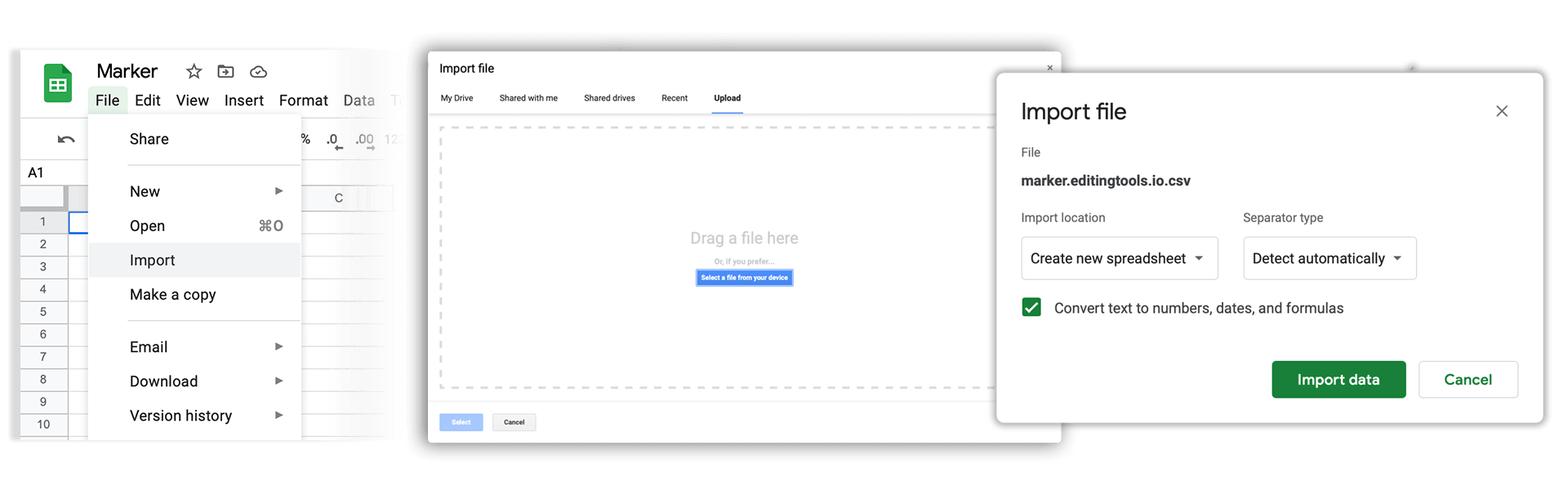
How do I import a csv file into Google Sheets?

Open Google Sheets and go to "File → Import". Upload the generated CSV file and press "Import Data" to generate a Sheet.

How do I import a csv file into Apple Numbers?

Open Numbers and go to "File → Open". Simply open the CSV file.

Підтримка

Якщо у вас виникли запитання або побажання щодо функцій, будь ласка, зв'яжіться з нашою службою підтримки. Ми будемо раді допомогти вам!

ПОШИРЕНІ ЗАПИТАННЯ

No, you still need to send out the final cue sheet. This tool will only help you to create them more quickly.

In order to upload AAF files, you will need a PRO account and to use our Cue Sheet Manager.

Our Cue Sheet Manager allows to edit entries.

Автоматизуйте свої робочі процеси за допомогою нашого API

Якщо ви розробник або просто хочете автоматизувати більше процесів за допомогою таких інструментів, як Zapier або Make, ви можете легко інтегрувати цей інструмент у свої робочі процеси за допомогою нашого API. Дізнайтеся більше про інтеграцію REST API в нашій документації по API.

Документація API