1. Export a TXT marker file from Avid Media Composer
To export timeline markers, go to: "Tools -> Marker". Right Click on "Export Markers as Text".
2. Use the "Конвертер маркерів" to convert the TXT marker file into a CSV file
Open the free Конвертер маркерів, select "Avid Media Composer > Marker Text (.txt)" and set "convert" to "CSV for Google Sheets". Generate and download the file. Якщо у вас виникли проблеми з конвертацією файлу, ви можете звернутися до безкоштовної служби підтримки.
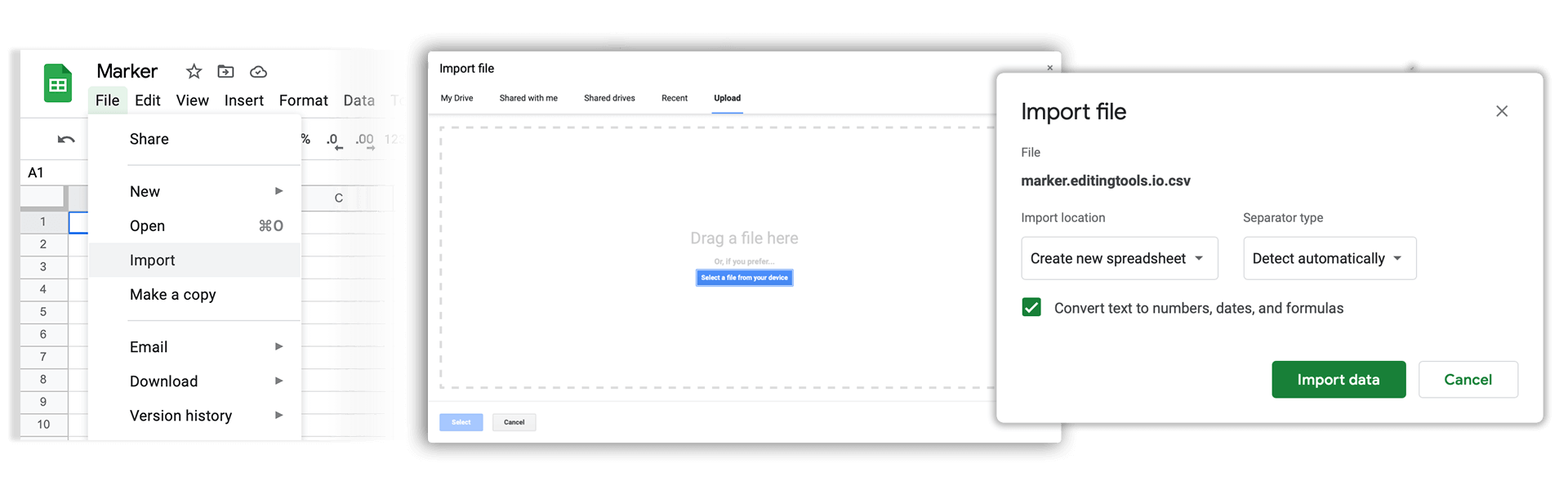
3. Import the CSV file into Google Sheets
Open Google Sheets and go to "File -> Import". Upload the generated CSV file and press "Import Data" to generate the Sheet with all markers.
🚀 Готово
Поки що все! Якщо цей посібник був корисним, поділіться ним, щоб підтримати нас. Якщо у вас є пропозиції, як покращити робочий процес, повідомте нам!