1. Export Markers from Avid Pro Tools
Open the Markers panel in Pro Tools and export the markers as the .txt file. Alternatively, you can choose "File > Export > Session Info As Text" from the Pro Tools menu and select the Include Markers option to create the text file containing the markers with their location, name, and comments.
2. Use the "Конвертер маркерів" to convert the TXT Markers marker file into a CSV file
Open the free Конвертер маркерів, select "Avid Pro Tools > TXT Marker (.txt)" and set "convert" to "CSV for Google Sheets". Generate and download the file. Якщо у вас виникли проблеми з конвертацією файлу, ви можете звернутися до безкоштовної служби підтримки.
3. Import the CSV file into Google Sheets
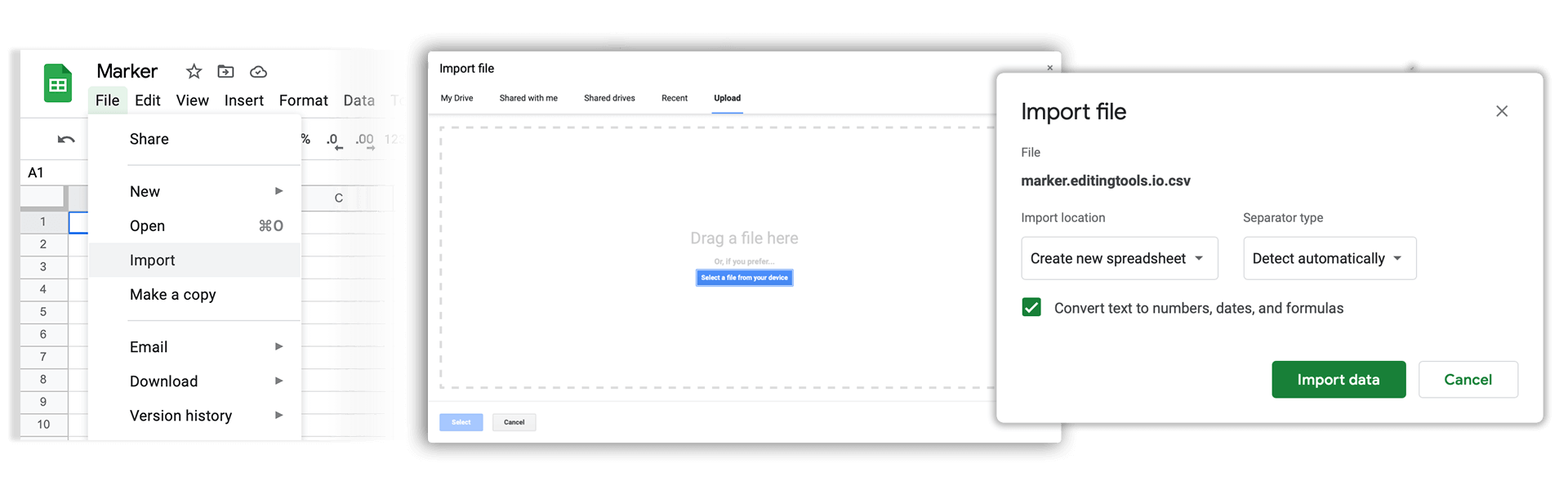
Open Google Sheets and go to "File -> Import". Upload the generated CSV file and press "Import Data" to generate the Sheet with all markers.
🚀 Готово
Поки що все! Якщо цей посібник був корисним, поділіться ним, щоб підтримати нас. Якщо у вас є пропозиції, як покращити робочий процес, повідомте нам!