MediaDB

MediaDB

MediaDB — незамінний інструмент для невеликих постпродакшн-студій і фрилансерів, які працюють з великою кількістю жорстких дисків та інших носіїв. Застосунок допомагає створити базу даних усіх жорстких дисків і файлів, що використовуються. Він дає змогу шукати файли та переглядати дерево каталогів, навіть коли диски не підключені. MediaDB також можна використовувати для створення RCP-файлу для DaVinci Resolve з EDL під час конформінгу фільму.

Особливості

  • Manage hard drives and discs offline
  • Index files like source material, archive footage and more
  • Search for files without connecting a drive
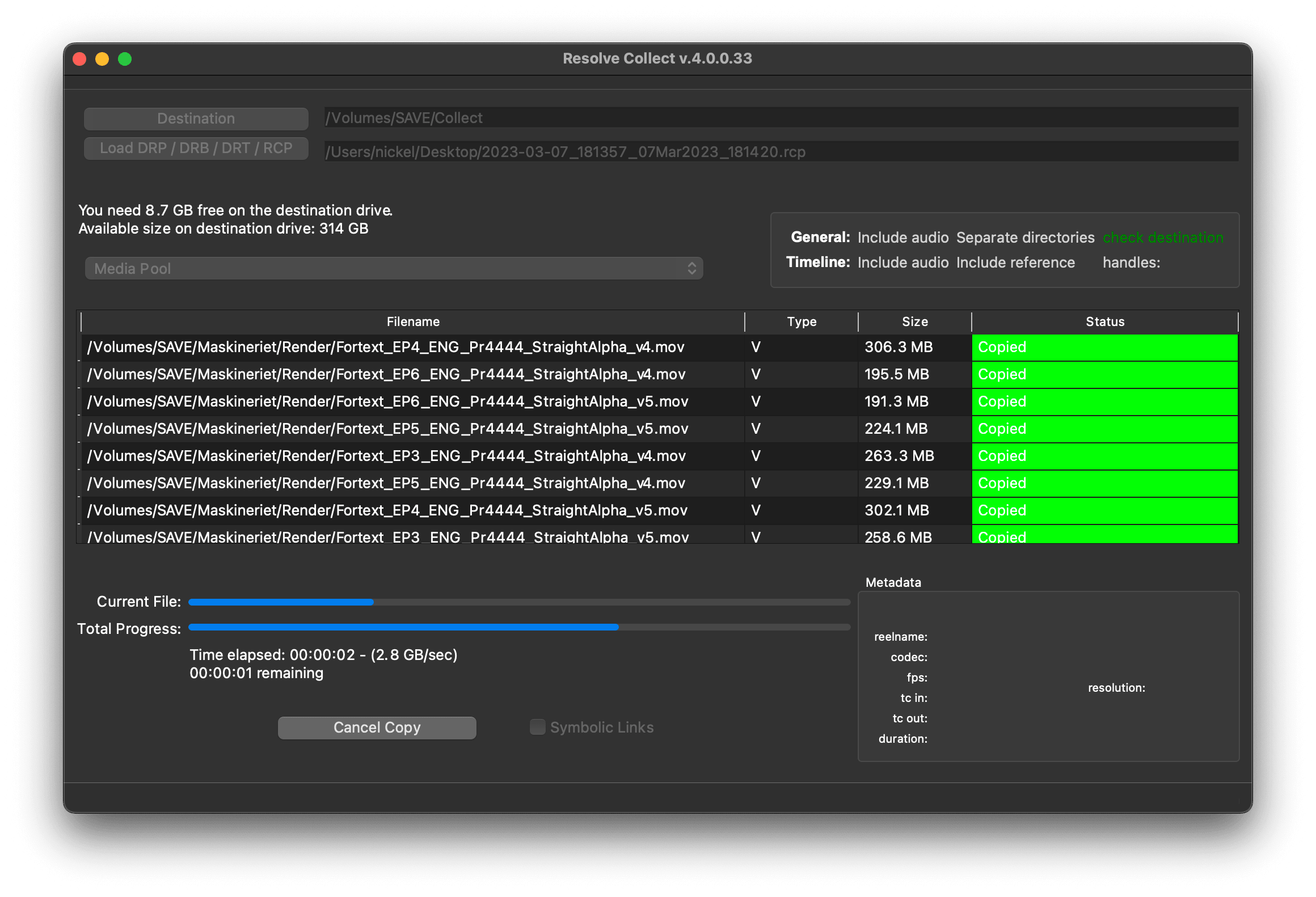
  • Create RCP files with EDL for Resolve Collect

The perfect tool to manage a huge archive of drives in small post-production studios or for freelancers.

The demo version allows to scan the first 50 files on each drive.

Requires macOS 11.5 or later

Manage hard drives and disc archives easily.

Index Drives

Scans the hard drives and add them it to the database. Make sure every drive has a unique name. If you add or remove files from the drive you can scan it again and the database will be updated.


Search files without the drive

Use MediaDB to find a file when you need it without connecting any drives to your computer.

Group file sequences

When selected, each file sequence will be presented in the format filename[start-end].extension


Get Folder Size

Select a folder and press the “Get Folder Size” button to calculate the size of all folders and files recursively.

Conform

Import an EDL from any NLE with full reel names (e.g. File_129), and MediaDB will find the files and tell on which drives they are on. It will also create an RCP file, which you can then use with Resolve Collect to copy all the files.

Use cases of MediaDB

Film Editors working on multiple projects often need to use multiple discs to store source footage and other assets. Rather than connecting hard drives to the computer and trying to find the correct file, MediaDB can easily locate the file. A quick search in the app is enough to find the necessary file and locate the correct disc. This is especially useful if the archive includes SD cards, USB sticks, and other virtual drives.

Виберіть ліцензію

We offer three types of licenses. The single-user license is ideal for freelancers who want to use the software on one or two computers. This license is tied to a single account. For companies, we offer a team license, which is bound to the company. The number of licenses can be chosen upon purchase, with a minimum of three licenses. We also offer an enterprise option. Please contact our sales team for more information. All licenses are perpetual.

Радимо увійти в систему перед покупкою, щоб мати зручний доступ до майбутніх оновлень плагіна.
Ліцензія для одного користувача
loading...
Team License (3+ users)
loading...
Щоб отримати ліцензію Enterprise, зверніться до нашого відділу продажів.

Зверніть увагу: сам плагін наразі доступний лише англійською мовою.

Вас буде перенаправлено на захищену сторінку оплати «Paddle». Paddle.com виступає як Merchant of Record.

Зворотне нарахування ПДВ (Reverse Charge): Якщо ви купуєте для компанії й маєте VAT ID, у деяких країнах ви можете скористатися процедурою зворотного нарахування ПДВ (reverse charge). На сторінці оформлення замовлення після вибору країни та поштового індексу натисніть ліворуч «Add VAT ID».

Bundle

Resolve Collect and MediaDB

25% off
Радимо увійти в систему перед покупкою, щоб мати зручний доступ до майбутніх оновлень плагіна.

Підтримка

Якщо у вас виникли запитання або побажання щодо функцій, будь ласка, зв'яжіться з нашою службою підтримки. Ми будемо раді допомогти вам!

ПОШИРЕНІ ЗАПИТАННЯ

Після завантаження розпакуйте zip-архів і запустіть файл .pkg. Далі просто дотримуйтесь вказівок майстра встановлення.

From the app menu, select File > Register. Enter your license key in the "Key" field.

To remove a license from a device, choose File > Register from the app menu. Click on "Remove License".

You can save the database file to a server and connect to it there. However, be aware that the connection speed will be much slower. For the best speed, it’s better to have one master database file that you distribute to all the machines that need to access it.

Так, якщо доступні оновлення, ви можете завантажити їх безкоштовно.

Ні, цей додаток працює в режимі офлайн і не ділиться жодними даними вашого проекту в Інтернеті.

Ця програма підтримується лише на macOS.

Ви можете просто видалити файл .app зі свого комп'ютера.

Якщо вам потрібна функція для додатку, нова опція або кастомна версія, будь ласка, надішліть нам повідомлення. Ми надаємо індивідуальні рішення для вашого бізнесу.

Nikolai Waldman leads development for this app, which is published and distributed via EditingTools.io.